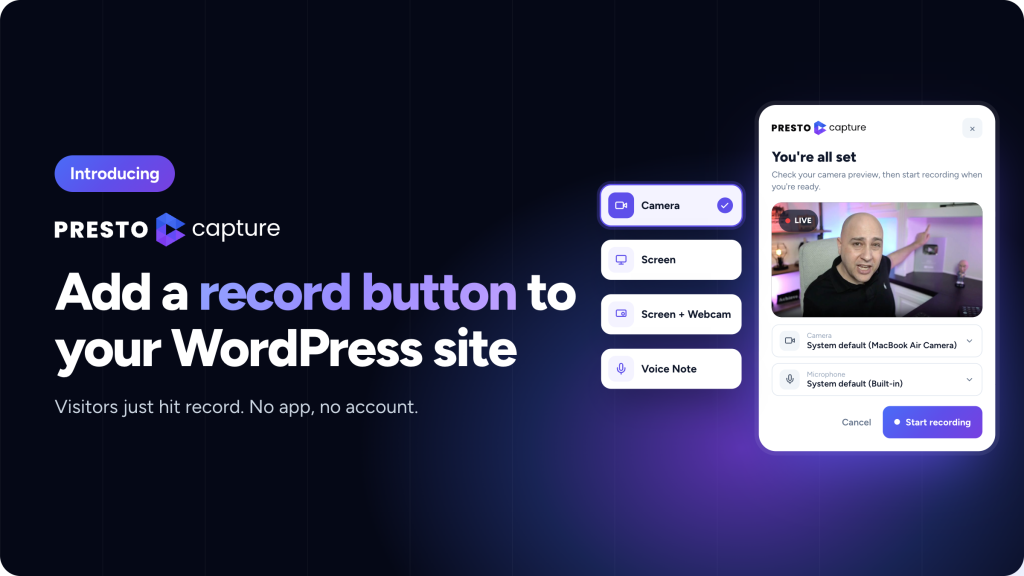
Today, we’re launching Presto Capture, a WordPress plugin that lets people record and send you videos directly from your website.
Visitors can record their camera, screen, both together, or a voice note. They can review the recording before submitting it, and you’ll find it in your Presto Player Media Hub.
A video can show you what a message can’t
A customer submits a support request: “It doesn’t work.”
You ask what they’re seeing. They reply, “The button.”
Which button?
Now imagine they send a 30-second screen recording showing the problem. You can see what happened and respond with a solution instead of going back and forth.
The same idea applies to customer testimonials, student assignments, member feedback, and product reviews. Sometimes, letting someone show you what they mean is much easier than asking them to explain it in words.
But collecting video can be a pain. People install an app, record, upload a file, copy a link and email it to you. Then you may need to download the video and upload it again before you can use it on your site.
Every extra step makes it easier for someone to put it off.
Presto Capture removes those extra steps by letting people record directly on your WordPress site.
How Presto Capture works
1. Add a recorder to your site
Add the Presto Capture block to a page and choose where recordings are saved, how long they can be, and who can record.
2. Let people record
Visitors click the record button and choose their camera, screen, screen with a webcam bubble, or voice note. They can review their recording before submitting it.
3. Review and use the recordings
Recordings appear in Presto Capture’s recording area and your Presto Player Media Hub, ready for you to review and use.
No separate recording app or file-sharing workflow is needed.
Does Presto Capture require Presto Player?
Yes. Presto Capture works alongside the free Presto Player plugin, which must be installed and activated on your WordPress site.
You don’t need a Presto Player Pro license to use Capture’s basic recording workflow. You can save recordings to your WordPress Media Library with the free plugin.
Want to save recordings to Bunny.net Stream instead? You’ll need Presto Player Pro, and Bunny.net will bill you directly for storage.
In short: Presto Capture is a paid plugin that requires the free Presto Player plugin. Presto Player Pro is optional, depending on your storage needs.
What can you use Capture for?
Collect customer testimonials and product reviews
Give customers a simple way to share their experience on video.
With WooCommerce, you can collect video reviews alongside product reviews. With SureCart, customers can share video reviews on product pages.
Get clearer support requests
Instead of asking customers to describe a problem, let them record their screen and show you what happened.
With SureForms, you can add a recording field to a form so recordings arrive with the form submission.
Make online communities and courses more interactive
With SureDash, members can reply to discussions with video. You can also restrict recordings to logged-in users and control access to submissions.
For courses and assignments, students can record a presentation or demonstrate their work.
Make client feedback easier for agencies
Add a recorder to a staging site or a dedicated feedback page. Clients can talk through what needs to change rather than sending a long list of notes or scheduling another call.
You can also collect video testimonials from happy customers and organize them for later use.
Works with the WordPress tools you already use
Presto Capture integrates with SureDash, SureForms, SureCart and WooCommerce to support these workflows.
You can also add Capture to pages built with page builders like Elementor, Bricks, Beaver Builder, and the Classic Editor using a shortcode.
Your recordings stay in your storage
Presto Capture sends recordings directly to your WordPress Media Library or your own Bunny.net account. Recordings don’t pass through Brainstorm Force’s servers.
Recordings saved to your Media Library use your site’s storage. If you choose Bunny.net Stream, you’ll need Presto Player Pro, and Bunny.net will bill you directly.
You can control who is allowed to record and keep submissions private while you review them. Guest submissions aren’t automatically published as public videos.
What you’ll need
To use Presto Capture, your site needs:
- WordPress 6.7 or newer
- PHP 7.4 or newer
- Free Presto Player installed and active
- HTTPS enabled
Camera and voice recordings work on supported mobile browsers. Screen recording requires a desktop browser.
You don’t need Presto Player Pro unless you want to save recordings to Bunny.net Stream.
Read the getting-started guide
Get Presto Capture for $199
Presto Capture is available for a one-time payment of $199, with a lifetime license for up to 10 sites.
This is our launch price. We’ll update the price when the launch offer ends.
If you’re not sure where to start, pick one page. A testimonial page or a support form is an easy first choice.
Add the Capture block, record a test video yourself, and check that it lands in your Media Hub. You don’t have to change anything else on your site.