Managing your videos should feel as good as the videos themselves. The old admin was functional, but it was starting to show its age. So we went back to the drawing board and rebuilt the entire experience from scratch.
Everything is cleaner, easier to navigate, and much more intentional. Here’s what changed.
A Real Dashboard to Start From
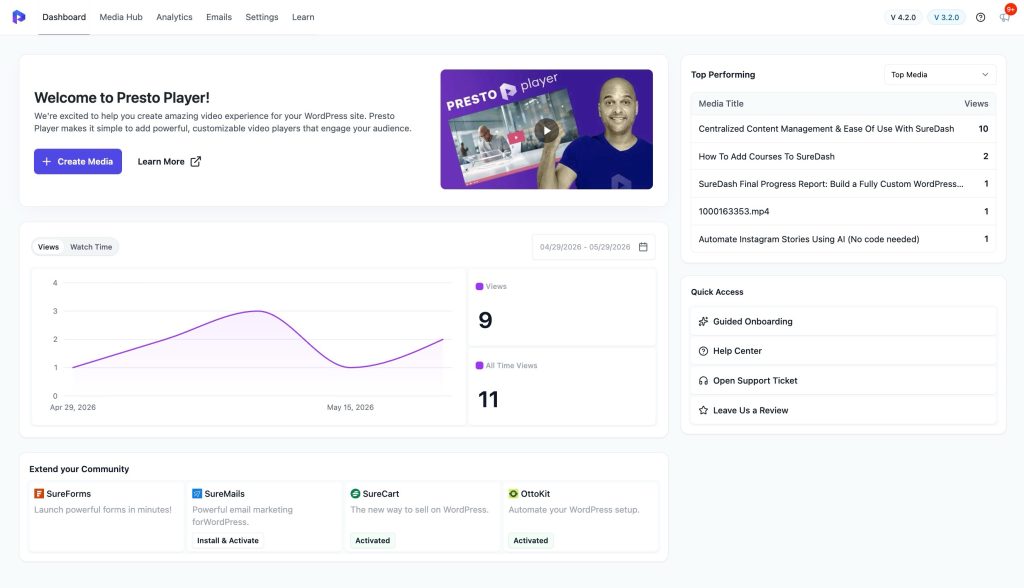
Before this update, opening Presto Player dropped you straight into the Media Hub. There was no real home base. No quick way to see how your videos were performing or where to go next.
The new Dashboard fixes that. You now land on a page that shows your top performing videos, recent view stats, and quick access links to Guided Onboarding, the Help Center, and Support. Everything you need, right at the start.
Media Hub, Refreshed
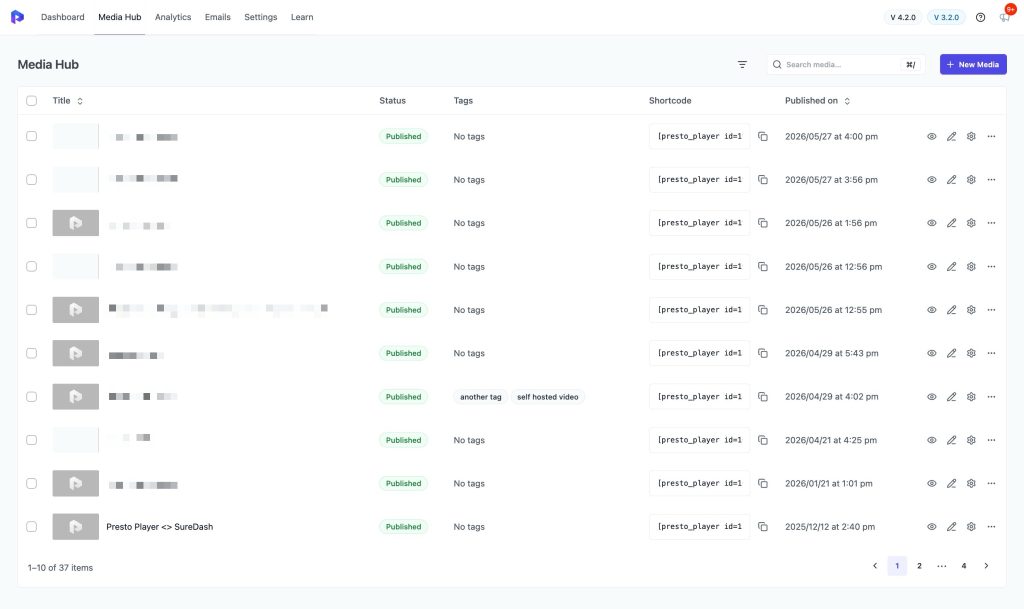
The Media Hub still does what it always did. But now it looks the part. The layout is cleaner, the table is better structured, and managing your video library just feels more organised than before.
Analytics, Given Its Own Space
Analytics was always buried. Now it has a proper dedicated page where you can track Views and Watch Time, filter by date range, see your Top Media ranked by total views and average watch time, and check which users are engaging the most. No digging around. Just the data you need, where you’d expect it.
Settings, Finally Organised
If you’ve ever gone into Settings and had to hunt for something, this one’s for you. Everything is now grouped into clear sections: General, Integrations, and Performance. Much easier to find what you’re looking for.
A Emails Tab
Email capture submissions from your videos still have their own dedicated space in the admin. The Emails tab keeps all your submissions in one place, easy to find and manage.
The Learn Tab: Get Set Up Without the Guesswork
New to Presto Player? Or just never explored everything it can do? The new Learn tab walks you through the whole setup in chapters. Getting Started, Player Customization, Branding, Embedding, Analytics, Integrations — all laid out step by step, with progress tracking so you always know where you left off.
Changelog
Presto Player 4.2.0 & Pro 3.2.0
New: Redesigned admin experience with a refreshed, modern interface for easier navigation and a cleaner overall look.
New: Dedicated Dashboard replacing the previous Media Hub landing page, with top-performing videos, view stats, and quick access links.
New: Standalone Emails tab for managing video email capture submissions.
New: Learn tab with step-by-step onboarding chapters to help users get the most out of Presto Player.
Improvement: Media Hub redesigned with a cleaner, more modern layout.
Improvement: Settings tab recategorised into General, Integrations, and Performance sections for easier navigation.
We’ve been listening to your feedback and squashing bugs. Presto Player Core 4.1.2 & Pro 3.1.3 is a focused stability release that improves the experience for international users, gives developers more control over video SEO, and resolves several edge-case issues.
What’s New
Control Your Video SEO Schema
Presto Player automatically outputs structured data (JSON-LD schema) for your videos to help search engines understand and index your content. With 4.1.2, you now have full control over this behavior through new filters:
Disable schema entirely for specific videos or globally if your theme or SEO plugin already handles it.
Modify the schema output to add custom fields like contentUrl, uploadDate, or any property supported by the VideoObject schema This is especially useful if you’re running a dedicated SEO plugin and want to avoid duplicate schema markup.
presto_player_schema_enabled – Disable schema through this filter hook entirely for specific videos or globally if your theme or SEO plugin already handles it.
presto_player_schema_data – Modify the schema output to add custom fields like contentUrl, uploadDate, or any property supported by the VideoObject schema.
Improved Internationalization
This release includes several fixes that make Presto Player work better for non-English sites:
Korean locale fatal error resolved – Sites using Korean (and other languages with special characters) will no longer encounter a critical error caused by player label formatting.
Playlist “Next” button is now translatable – Previously hardcoded, the “Next” label in playlists can now be translated to your site’s language. We also fixed the “Up Nexts” typo while we were at it.
Missing text domains added – Several strings that were previously untranslatable are now properly marked for translation. If you’re running a multilingual site or serving content in a non-English language, this update is especially recommended.
Bug Fixes
Fixed PHP deprecation warning in CSS sanitization that could appear on PHP 8.1+ sites.
Fixed undefined array key error in the reusable video block that could occur under certain conditions.
Restored filterable video attributes on video components, allowing the Pro plugin and custom code to modify attributes like crossorigin on the
Fixed _load_textdomain_just_in_time notice on WordPress 6.7+ by deferring the analytics library setup to the proper hook.
Under the Hood
Updated the NPS Survey library to v1.0.21 for improved stability.
Update Now
As always, we recommend backing up your site before updating. You can update directly from your WordPress dashboard under Plugins → Updates.
Changelog
Presto Player 4.1.2
New: Added filters to disable or modify video SEO schema output.
Improvement: Updated NPS Survey library to v1.0.21.
Fix: Resolved fatal error with Korean locale caused by invalid format specifiers in player labels.
Fix: Made playlist ‘Next’ button label translatable and fixed ‘Up Nexts’ typo.
Fix: Resolved PHP deprecation warning in CSS sanitization.
Fix: Fixed undefined array key error in reusable video block.
Fix: Restored filterable video attributes on video components.
Fix: Added missing text domain for untranslatable strings.
Fix: Fixed _load_textdomain_just_in_time notice on WordPress 6.7+ by deferring analytics setup.
Presto Player Pro 3.1.3
Fixed: Added crossorigin attribute to Bunny.net videos only when caption tracks are present, preventing unnecessary CORS preflight requests on videos without captions.
Fixed: Corrected ‘licence’ typo to ‘license’ in user-facing strings.
Fixed: Undefined array key ‘src’ warning in BunnyCDNBlock.
Automatic captions are now supported for Bunny.net videos. When enabled in Presto settings, captions are generated automatically after upload and added to the player once processing is complete. Caption generation runs in the background and does not affect playback. Processing time and availability depend on video length. Additional languages can be generated later if needed, with support for 50+ languages. Standard Bunny.net transcription charges apply. Enable captions to improve accessibility and reach for your video content!
Change log – Presto Player Core 4.1.0 & Presto Player Pro 3.1.0
We want to hear from you! We’ve introduced in-app feedback surveys to better understand your needs. Please take a moment to share your experience so we can continue improving the platform.
Presto Player 4.0.8
Improvement: Introduced a new NPS feedback survey.