
- How to Create a Presto Popup
- Video Presets
- Video Security
- Performance Preferences
- Video Settings
- Shortcodes
- Capture Emails
- Audio
- Video / Audio Timestamps
- Playlists
- How to Use Instant Video Pages in Presto Player
- Automatic Video Syncing
- Dynamic Watermark
- Video Presets
- Automatic Captions in Presto Player
- How to Use Video Presets in Presto Player – Layouts and Behavior
- How to Customize Video Presets – Settings and Layout Options
- How to Use Shortcodes in Presto Player
- How to Use Advanced Shortcodes and Timestamps
Video Security Features Explained
Keeping your videos private matters, especially for courses, memberships, and paid content. While no system can fully stop someone from sharing or recording a video, Presto Player includes tools that help limit access and reduce casual misuse. This page explains the available security options in simple terms, what they do, and when to use them.
Who Can Access Private Videos
All private videos require the viewer to be logged in to your website. If someone is not logged in, they cannot watch the video. Presto Player supports two main ways to protect private videos, depending on where your videos are hosted.
Self-Hosted Private Videos
Self-hosted private videos are stored and uploaded on your own website and protected per user.
How this works:
- Each viewer receives a unique video link when served on the page
- The link only works for the logged-in user
- Sharing the link with someone else does not work
- The link cannot be reused outside the user’s login session
Because the video access is tied to the user’s account, it helps prevent direct sharing. Additional protections are also being added to make it harder to open or download these videos outside the player.
Bunny.net Private Videos
When using Bunny.net, private videos are protected using temporary access links from Bunny.net.
What this means:
- Video links expire after a short period of time
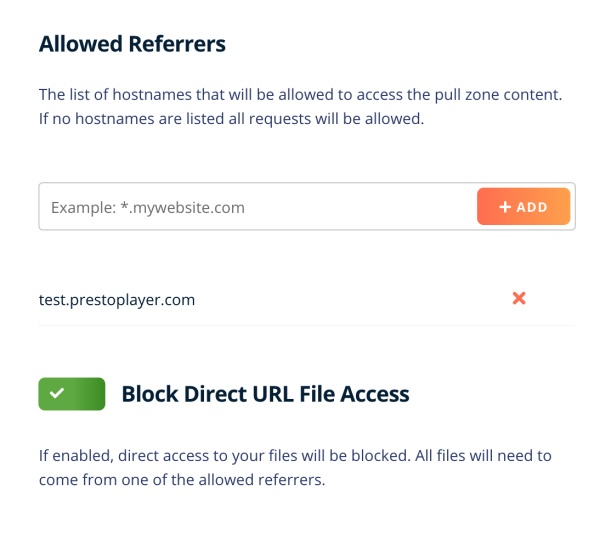
- Videos can be restricted to only play on your website
- Links do not work if opened elsewhere or shared
This helps prevent people from copying video URLs or reusing them outside your site.
You can learn how to connect Presto Player with Bunny.net in the Bunny.net integration documentation.
HLS Streaming
Presto Player Pro also supports HLS video streams. HLS is a streaming format that delivers videos in small pieces instead of a single file.
This helps by:
- Adjusting video quality automatically based on the viewer’s internet speed
- Making videos harder to download using basic tools
- Supporting time-limited access when private settings are enabled
When used with Bunny.net, HLS streams also expire after a set time.
Dynamic Watermark (Content Protection)
Presto Player Pro also supports dynamic watermarks as an extra layer of protection. A dynamic watermark adds a visible text overlay to your video, such as your site name or brand. The watermark stays visible while the video plays and can optionally move positions over time.
This makes it harder for videos to be reused or shared without attribution, while still giving you control over how the watermark looks through presets. You can learn more in the dynamic watermark documentation.
Important Things to Know
No video protection method is perfect. Anyone can still record a video using screen recording software. These features are designed to reduce easy sharing, discourage downloads, and protect your content from casual misuse, not to guarantee complete prevention.
Conclusion
Presto Player’s video security features work best when combined. Logged-in access, expiring links, HLS streaming, and dynamic watermarks each add a layer of protection. While they cannot stop every form of copying, they help control access, limit sharing, and protect the value of your video content.
We don't respond to the article feedback, we use it to improve our support content.