
- How to Get Started with Presto Capture
- Why Presto Capture Needs HTTPS
- Presto Capture Block Settings
- Presto Capture Shortcode Reference
- How to Choose Where Recordings Are Saved in Presto Capture
- How to Control Who Can Record in Presto Capture
- How to Brand the Recorder in Presto Capture
- Understanding the Presto Capture Admin Panel
- How to Manage Recordings in Presto Capture
- How to Activate Your Presto Capture Licence
- Troubleshooting Presto Capture
- Privacy and Recordings in Presto Capture
- Presto Capture FAQ
- How to Add a Recording Field to SureForms with Presto Capture
- How to Add Video Replies to SureDash Discussions
- How to Collect Video Reviews in WooCommerce with Presto Capture
- Presto Capture for Developers: REST API and PHP Filters
- How to Allow Camera, Microphone, and Screen Access in Presto Capture
- How to Collect Video Reviews in SureCart with Presto Capture
How to Activate Your Presto Capture Licence
Your Presto Capture licence key keeps the plugin up to date with automatic updates. Presto Capture is its own product with its own key, separate from Presto Player Pro. You get one key per site from your account on prestomade.com.
Applies to: Presto Capture 1.0.0 and above.
Before You Begin
- Presto Capture installed and active.
- Your licence key from your https://my.prestomade.com account.
How to Activate Your Licence
- Log in to your account on https://my.prestomade.com.
- Copy your Presto Capture licence key.
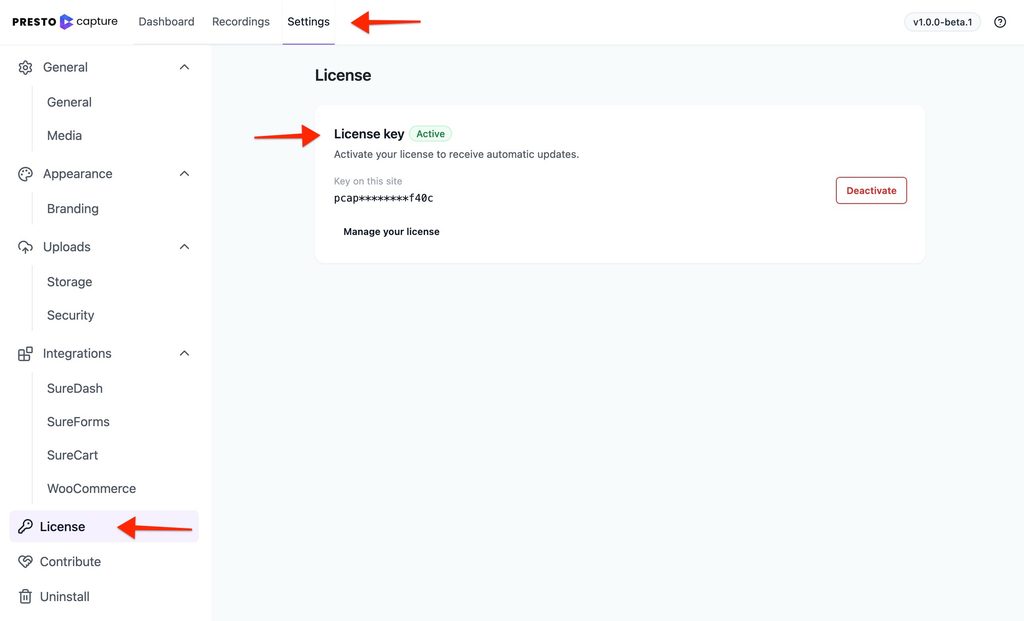
- Go to Presto Capture > Settings in your WordPress dashboard.
- Click the License tab.
- Paste your key into the licence field.
- Click Activate.
How to Deactivate Your Licence
Moving to a new site? Deactivate the key on the old site first, so you can use it on the new one.
- Go to Presto Capture > Settings.
- Click the License tab.
- Click Deactivate.
What Happens Without a Key
Presto Capture keeps working without an active key:
- Visitors can still record.
- Saved videos still play.
- Automatic updates stop.
- A reminder notice shows in your WordPress dashboard.
Tip: Keep your key active so you always get the latest fixes and new features.
How Updates Work
With an active key, new versions of Presto Capture show up on your Dashboard > Updates screen, just like any other plugin. You can update with one click.
If you have any questions or need further help, feel free to reach out to our support team. We’re always happy to help!
We don't respond to the article feedback, we use it to improve our support content.