
- How to Set Rate Limits and Upload Security in Presto Capture
- How to Get Started with Presto Capture
- Why Presto Capture Needs HTTPS
- Presto Capture Block Settings
- Presto Capture Shortcode Reference
- How to Choose Where Recordings Are Saved in Presto Capture
- How to Control Who Can Record in Presto Capture
- How to Brand the Recorder in Presto Capture
- Understanding the Presto Capture Admin Panel
- How to Manage Recordings in Presto Capture
- How to Activate Your Presto Capture Licence
- Troubleshooting Presto Capture
- Privacy and Recordings in Presto Capture
- Presto Capture FAQ
- How to Add a Recording Field to SureForms with Presto Capture
- How to Add Video Replies to SureDash Discussions
- How to Collect Video Reviews in WooCommerce with Presto Capture
- Presto Capture for Developers: REST API and PHP Filters
- How to Allow Camera, Microphone, and Screen Access in Presto Capture
- How to Collect Video Reviews in SureCart with Presto Capture
- Understanding Trust Tiers in Presto Capture
- How to Approve, Reject and Block Recordings in Presto Capture
- How to Clean Up Unused Recordings in Presto Capture
- How to Protect Private Recordings on NGINX in Presto Capture
- What Happens When You Uninstall Presto Capture
What Happens When You Uninstall Presto Capture
By default, deleting Presto Capture leaves your settings and every recording right where they are. That way you can reinstall it later and pick up where you left off. If you want a clean removal, you choose what goes before you delete the plugin.
Applies to: Presto Capture 1.0.0 and above.
Choose What to Remove
- Go to Presto Capture > Settings > Uninstall.
- Turn on the options you want. Both are off by default.
- Click Save.
- Deactivate and delete Presto Capture from the Plugins screen.
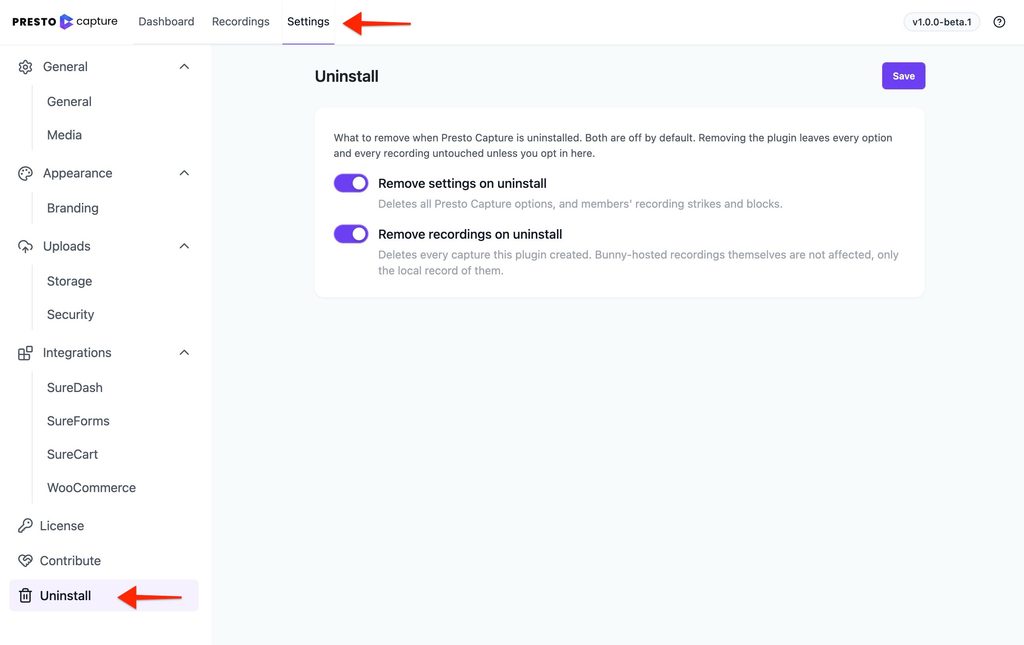
| Option | What it removes |
|---|---|
| Remove settings on uninstall | All Presto Capture settings, plus members’ strikes and blocks |
| Remove recordings on uninstall | Every capture Presto Capture created |
Note: Turning on Remove recordings on uninstall asks you to confirm with Yes, remove recordings. This can’t be undone.
What Stays Behind
- Videos in Bunny.net. Removing recordings deletes only the record of them on your site. The videos stay in your Bunny.net library until you delete them there.
- Presto Player. It stays installed, with its own settings and Media Hub.
- Reviews, replies, and form entries. These belong to WooCommerce, SureCart, SureDash, and SureForms, so they stay.
Just Deactivating?
Deactivating doesn’t remove anything. Recorders stop showing on your pages, and everything comes back when you activate the plugin again.
Tip: When you deactivate, a short survey may ask why. Answering it is optional.
You can now remove Presto Capture with exactly as much or as little cleanup as you need.
If you have any questions or need further help, feel free to reach out to our support team. We’re always happy to help!
We don't respond to the article feedback, we use it to improve our support content.